

Claude Cowork is an agentic AI tool from Anthropic designed to perform complex, multi-step tasks directly on your computer's files.
As of early 2026, Claude Cowork is a Research Preview.
In this blog post, I will share some common security risks and possible mitigations for protecting against the risks coming with Claude Cowork.
Background
Claude Cowork represents a significant shift from "Chat AI" to "Agentic AI." Because it has direct access to your local filesystem and can execute commands, the security model changes from protecting a conversation to protecting a system user.
Practical Use Cases:
- Data Extraction: Point it at a folder of receipt images and ask it to create an Excel spreadsheet summarizing the expenses.
- Research & Synthesis: Ask it to read every document in a "Project Alpha" folder and draft a 10-page summary report in a new Word document.
- Automation: Schedule recurring tasks (e.g., "Every Friday at 4 PM, summarize my unread Slack messages and email them to me").
Core Features:
- Filesystem Access: Unlike the web version of Claude, Cowork runs within the Claude Desktop app. You grant it permission to a specific folder on your Mac or PC, and it can read, rename, move, and create new files (like spreadsheets or Word docs) within that space.
- Agentic Execution: It doesn't just give you advice; it executes a plan. If you ask it to "organize my messy downloads folder," it will categorize the files, create subfolders, and move everything into place while you do other things.
- Parallel Sub-Agents: For large tasks—like researching 50 different PDFs—it can spin up multiple "sub-agents" to work on different parts of the task simultaneously.
- Connectors & Plugins: Through the Model Context Protocol (MCP), Cowork can connect to external apps like Slack, Google Drive, Notion, and Gmail to pull data or perform actions across your workspace.
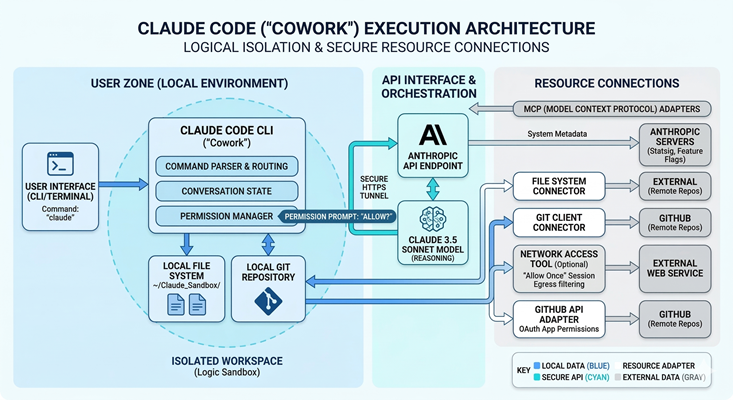
Below is a sample deployment architecture of Claude Cowork:
Security Risks
Think of Claude Cowork as a helpful intern who has the keys to your office. Because it can actually move files and click buttons, the risks are different than just "chatting."
Indirect Prompt Injection
This occurs when an adversary places malicious instructions inside a document (PDF, CSV, or webpage) that the AI is instructed to process. When Claude reads the file, it treats the hidden text as a high-priority command. This can lead to unauthorized data exfiltration or the execution of unintended system commands.
Reference: LLM01:2025 Prompt Injection
Third-Party Supply Chain Vulnerabilities
Claude uses the Model Context Protocol (MCP) to interact with external applications. Integrating unverified or community-developed MCP servers introduces a supply chain risk. A compromised or malicious connector can serve as a persistent backdoor, granting attackers access to local files or authenticated cloud sessions (Slack, GitHub, etc.).
Reference: LLM03:2025 Supply Chain
Excessive Agency
This risk stems from granting the AI broader permissions than necessary to complete a task (failing the Principle of Least Privilege). Because Claude Cowork can autonomously modify the filesystem, a logic error or "hallucination" can result in large-scale data corruption, unauthorized deletions, or unintended configuration changes without a human-in-the-loop.
Reference: LLM08:2025 Vector and Embedding Weaknesses
Insufficient Monitoring and Logging
Because Claude Cowork executes many actions locally on the user's machine, these activities often bypass the centralized enterprise security stack (SIEM/EDR) logging. This lack of a "paper trail" prevents security teams from performing effective incident response, forensic analysis, or compliance auditing if a breach occurs.
Reference: LLM10:2025 Unbounded Consumption
Practical Recommendations
To defend against these threats, follow these industry-standard "Guardrail" practices:
The "Isolated Workspace" Strategy
The "Isolated Workspace" strategy (sometimes referred to as the "Sandboxed Folder" or "Claude Sandbox" approach) is a recognized security best practice for using local AI agents like Claude Code and Claude Cowork.
Anthropic
Anthropic explicitly warns against giving Claude broad access to your filesystem. Their security documentation for Claude Code and the local agent architecture emphasizes:
- Filesystem Isolation: Claude Code defaults to a permission-based model. Anthropic recommends launching the tool only within specific project folders rather than your root or home directory.
Reference: Claude Code Sandboxing
Amazon Bedrock
The AWS strategy shifts from local folders to IAM-based isolation and Tenant Isolation:
- Dedicated Scopes: AWS recommends using "Session Attributes" and scoped IAM roles to ensure an agent can only access specific S3 prefixes or data silos.
- VPC Isolation: For maximum security, AWS suggests running Claude-related tasks inside a VPC with AWS PrivateLink to prevent any data from reaching the public internet, mirroring the "Sandbox" concept at a network level.
Reference: Implementing tenant isolation using Agents for Amazon Bedrock in a multi-tenant environment
Azure
Azure handles "Isolated Workspaces" through Azure AI Studio and Microsoft Purview, focusing on data boundaries rather than just local folders:
- Managed Network Isolation (Azure AI Studio): Azure doesn't just suggest a folder; they suggest a Managed Virtual Network. This creates a "Sandbox" at the network layer where Claude (via models in AI Studio) can only see data sources you explicitly "attach."
Reference: How to set up a managed network for Microsoft Foundry hubs
- Information Protection for AI (Microsoft Purview): Microsoft uses Purview to prevent Claude from "stumbling" upon sensitive files (like .env files or SSH keys) if they are stored in SharePoint or OneDrive.
Reference: Microsoft Purview data security and compliance protections for generative AI apps
Google Vertex AI
GCP frames this as "Data Residency" and "VPC Service Controls":
- Boundary Control: Vertex AI documentation highlights the use of a "Security Boundary" to separate the AI agent from sensitive resources (like credentials).
- Managed Isolation: They recommend using Notebook Security Blueprints to protect confidential data from exfiltration when using Claude-powered agents in development environments.
Reference: Securely deploying AI agents
Disable "Always Allow" for High-Risk Tools
The recommendation to disable "Always Allow" and maintain a human-in-the-loop (HITL) for high-risk tools is a foundational security layer for AI agents. This strategy prevents "Zero-Click" or Cross-Prompt Injection (XPIA) attacks, where a malicious instruction hidden in a file or website could trick an agent into executing a dangerous command without your intervention.
Anthropic (Claude Code & Cowork)
Anthropic designed Claude Code with a "deliberately conservative" permission model. Their documentation explicitly advises against bypassing these prompts in local environments:
- Use the Default Mode or Plan Mode. The "Default" mode prompts for every shell command, while "Plan" mode prevents any execution at all.
References: Use Cowork safely, Claude Code: Configure Permissions & Modes
Amazon Bedrock Agents
AWS implements this via User Confirmation and Return of Control (ROC). They frame it as a requirement for "High-Impact" actions.
- For any tool that modifies data or accesses the network, AWS recommends enabling the "User Confirmation" flag in the Agent configuration. This pauses the agent and returns a structured prompt to the user.
Reference: Implement human-in-the-loop confirmation with Amazon Bedrock Agents
Azure (AI Foundry & Defender for Cloud)
Azure has recently integrated this into their security posture management. Microsoft Defender for Cloud will actually flag an AI agent as "High Risk" if it has tool access without human-in-the-loop controls:
- Azure recommends using Microsoft Entra Agent IDs with scoped, short-lived tokens. They explicitly recommend "selective triggering" for risky operations.
References: Azure AI security best practices, AI security recommendations
Google Cloud (Vertex AI Agent Builder)
GCP focuses on "Confidence Thresholds" and "Action Guardrails" within its Agent Engine.
- GCP recommends that any agent using the Model Context Protocol (MCP) or custom APIs should have a mandatory "Manual Review" step for any write operations.
Reference: Vertex AI Agent Builder
Scrub Untrusted Content
Treating external content as an attack vector is essential for preventing Indirect Prompt Injection (XPIA), where malicious instructions are hidden in data (like a white-text command in a PDF) rather than the user's prompt.
Anthropic
Anthropic explicitly identifies browser-based agents and document processing as the highest risk for injection. Their stance is that no model is 100% immune, so multi-layered defense is required:
- Anthropic suggests using Claude Opus 4.5+ for untrusted tasks, as it has the highest benchmarked robustness against injection (reducing attack success to ~1%).
References: Prompt Injection Defense, Using Claude in Chrome Safely
Amazon Bedrock Guardrails
AWS addresses this by programmatically separating "Instructions" from "Data" so the model knows which one to ignore if they conflict:
- Use Input Tagging to wrap retrieved data (like a PDF's text) in XML tags. This allows Bedrock Guardrails to apply "Prompt Attack Filters" specifically to the data without blocking your system instructions.
- AWS suggests a Lambda-based Pre-processing step to scan PDFs for hidden text or PII before the text ever reaches the LLM.
References: Securing Amazon Bedrock Agents, Prompt injection security
Azure (Prompt Shields and Spotlighting)
Azure provides the most direct "Scrubbing" tool with a feature called Spotlighting, which technically implements the "separate session" idea you mentioned.
- Enable Prompt Shields for Documents. This specifically detects "Document Attacks" where instructions are embedded in third-party content.
- Use spotlighting to transform document content (sometimes via Base64 encoding), so the model treats it as "lower trust" grounded data, preventing it from being executed as a command.
References: Prompt Shields, Prompt Shields in Microsoft Foundry
Google Cloud (Vertex AI Action Guardrails)
GCP treats this through Content Filtering and Manual Review nodes in the agent's workflow:
- GCP recommends "Gemini as a Filter." You use a smaller, faster model instance to "pre-read" and summarize a file in a low-privilege environment. If the summary contains instruction-like language (e.g., "ignore," "system," "delete"), the file is quarantined.
Reference: Safety in Vertex AI
Network Hardening
"Network Hardening" isn't just about blocking ports; it’s about establishing a Zero Trust egress policy for AI agents. Since Claude Desktop and Claude Code are effectively "execution engines" on your local machine, they require the same egress filtering you would apply to a production VPC.
Anthropic
Anthropic’s recent security documentation for Claude Code and Desktop highlights that "network isolation" is a core pillar of their sandboxing strategy:
- Use a Unix domain socket connected to a proxy server to enforce a "Deny All" outbound policy by default.
- For local setups, Anthropic suggests customizing this proxy to enforce rules on outgoing traffic, allowing only trusted domains (like anthropic.com or your internal API endpoints).
Reference: Claude Code Sandboxing, Auditing Network Activity
AWS
AWS frames this as "Egress Filtering" via the AWS Network Firewall. For an AI agent running in an AWS environment, the strategy is to block all traffic that isn't signed by a specific SNI (Server Name Indication):
- Use AWS Network Firewall with stateful rules to monitor the SNI of outbound HTTPS requests. If an agent tries to "phone home" to an unknown IP or a malicious C2 (Command & Control) server, the firewall drops the packet.
References: Restricting a VPC’s outbound traffic, Build secure network architectures for generative AI applications
Azure
Azure has introduced a specific feature called the Network Security Perimeter (NSP) to create a logical boundary for AI services.
- Even if an AI service has a public endpoint, the NSP acts as an "Application Firewall" that logs every access attempt and blocks exfiltration to any service outside that perimeter.
- Configure Azure Firewall Application Rules to allow only specific FQDNs (Fully Qualified Domain Names) required for your Claude-based workflows.
References: Add an AI Network Security Perimeter, Control outbound traffic with Azure Firewall
Google Cloud
GCP’s approach is the most rigid, using VPC Service Controls to prevent data exfiltration at the API layer, regardless of the network path:
- Wrap your AI project in a "Service Perimeter." If an agent inside this perimeter tries to send data to a Cloud Storage bucket or an external API not explicitly in the "Ingress/Egress" rule set, the request is blocked by the Google front-end.
Reference: Mitigating Data Exfiltration with VPC Service Controls
Summary
Claude Cowork marks a transition from AI that talks to AI that acts. By granting a digital agent direct access to your files and external apps via the Model Context Protocol, you gain a powerful "digital intern." However, this shifts the security focus from protecting a simple chat to securing a privileged system user capable of modifying data and executing commands.
To manage this risk, organizations must adopt a "Zero Trust" approach for agentic tasks. This means strictly isolating the agent's access to specific folders, requiring human approval for high-risk actions, and using cloud-native firewalls to prevent data exfiltration. By treating the AI as a high-risk user and enforcing strong monitoring, you can automate complex workflows without compromising your system's integrity.
Disclaimer: AI tools were used to research and edit this article. Graphics are created using AI.
About the Author
Eyal Estrin is a cloud and information security architect and AWS Community Builder, with more than 25 years in the industry. He is the author of Cloud Security Handbook and Security for Cloud Native Applications.
The views expressed are his own.



Top comments (14)
Excellent write-up! I really like that it doesn't just hype up agentic AI—it also highlights the security trade-offs that come with giving an AI real access to your files and systems. Too many people treat AI agents like "smarter chatbots," when in reality they're much closer to privileged users that need proper governance.
The recommendations around isolated workspaces, least privilege, human approval for sensitive actions, and network hardening are especially valuable. Prompt injection and malicious MCP connectors are risks that every organization experimenting with AI agents should be thinking about today, not after an incident happens.
I also appreciated that the article compares approaches across AWS, Azure, GCP, and Anthropic instead of focusing on a single vendor. It's a practical reminder that security fundamentals—Zero Trust, monitoring, segmentation, and least privilege—still apply, regardless of which AI platform you're using.
Looking ahead, I think we'll see AI agents become part of everyday workflows, but only organizations that build security in from day one will be able to scale them with confidence.
And after spending hours reading about security architectures and guardrails, it's never a bad idea to take a quick break. If you're looking for a bit of entertainment, check out voxcasino.auto.pl/
Hi, I'm going to buy Claude from this website seogbtools.com as I can't bear individual premium package right now, is it good to go with it? Anyone have used their tools before?
Excellent and highly insightful security breakdown—this article explains the real-world risks of agentic AI in a very practical and easy-to-understand way. I really liked how the mitigation strategies were mapped to AWS, Azure, and Anthropic best practices, making it useful even for teams managing sensitive workflows like download apk files and enterprise documents. A must-read post for anyone exploring secure AI automation.
As of early 2026, Claude Cowork stickman clash is still in the research and testing phase, meaning that many security mechanisms, access control, and user protection measures are still being refined.
The idea of Claude Cowork as an intern with the keys to your office is quite vivid. It’s fascinating that it can automate tasks like file organization, but the indirect prompt injection risk is a real concern. Who knew that AI could face such security challenges? Like checking emails on my phone, reading about the excessive agency risk got me thinking about data security.
As of early 2026, Claude Cowork stickman clash is still in the research and testing phase, meaning that many security mechanisms, access control, and user protection measures are still being refined.
Darktable 5.4.1 for Mac is a powerful open-source photo editing and RAW processing software designed for photographers seeking professional control over their images. Often described as a virtual darkroom, Darktable allows users to manage digital negatives, perform non-destructive editing, and export high-quality photographs with precision.
Darktable functions as a computerized darkroom, allowing photographers to mactorrent.info/ efficiently manage their digital negatives. It’s an open-source workflow application designed specifically to meet the needs of photography professionals.
Texas toast, crinkle-cut fries, and famous Cane’s sauce, the menu focuses on consistency and flavor rather than overwhelming choices. Whether you’re planning a quick bite or a full meal, understanding the [Canes menu] alongside Canes hours helps you pick the perfect time to enjoy their freshly prepared food without missing out.
A good way to think about securing Claude Cowork is to treat it like a privileged system user rather than a chatbot.
Key practical mitigations that work well across AWS/Azure/GCP setups:
In short: assume it will execute exactly what it’s tricked into doing, and design controls around that.
I also covered similar agent-security breakdowns and practical hardening approaches in a simpler form on filmapp.mx if you want a quick reference guide.
A big part of the brand’s appeal is its wide selection of Zaxby’s Sauces, which add bold, unique flavors to every bite, from sweet and tangy to spicy and smoky. With customizable meals and signature dipping sauces, Zaxby’s offers a satisfying dining experience for both new and loyal customers.