

Clawdbot (now renamed Moltbot) is an open-source, self-hosted AI assistant that runs on your own hardware or server and can-do things, not just chat.
It was created by developer Peter Steinberger in late 2025.
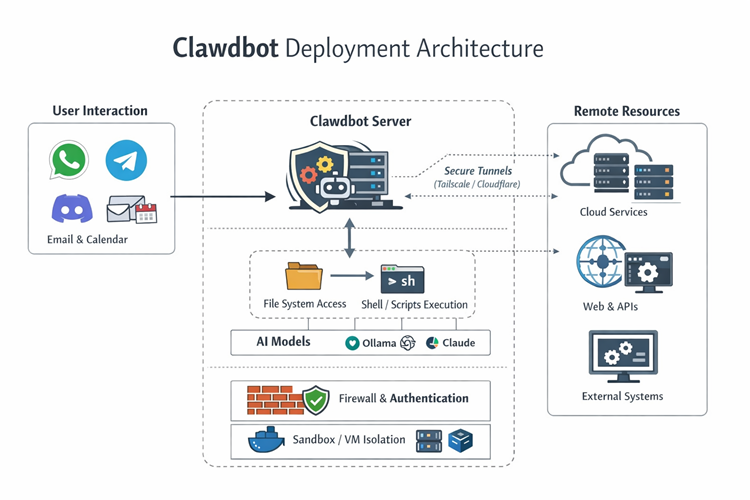
It connects your AI model (OpenAI, Claude, local models via Ollama) to real capabilities: automate workflows, read/write files, execute tools and scripts, manage emails/calendars, and respond through messaging apps like WhatsApp, Telegram, Discord and Slack.
You interact with it like a smart assistant that actually takes action based on your input.
What is it used for?
Clawdbot functions as a "digital employee" or a "Jarvis-like" assistant that operates 24/7. Because it has direct access to your local filesystem and system tools, it can perform proactive tasks that standard AI cannot:
- Communication Hub: It lives inside messaging apps like Telegram, WhatsApp, or Slack. You text it commands, and it can reply, summarize threads, or manage your inbox.
- Proactive Automation: It can monitor your email, calendar, and GitHub repositories to fix bugs while you sleep, draft replies, or alert you to flight check-ins.
- System Execution: It can run shell commands, execute scripts, manage files, and even control web browsers to perform actions like making purchases or reservations.
- Persistent Memory: It maintains long-term context across conversations, remembering your preferences and past tasks for weeks or months.
Below is a sample deployment architecture of Clawdbot:
Security risks associated with Clawdbot
Clawdbot is a high-privilege automation control plane. Since it manages agents, tools, and multiple communication channels, it presents serious security risks.
Control plane exposure & misconfiguration
- Exposure: Misconfigured dashboards and reverse proxies have left hundreds of control interfaces open to the internet.
- Authentication Failures: Some setups treat remote connections as local, letting attackers bypass authentication.
- Data Theft: Unsecured instances can expose API keys, conversation logs, and configuration data.
- System Takeover: In certain cases, attackers can run commands on the host with elevated privileges.
Prompt injection & tool blast radius
- Manipulation: Malicious or untrusted content can trick the AI into using tools in unintended ways.
- Blast Radius: Access to high-privilege tools like shell commands or admin APIs means a prompt injection could lead to data theft or lateral movement across the network.
- Model Weakness: Older or poorly aligned AI models are more likely to ignore safety instructions, increasing risk.
Social engineering and user level abuse
- Deception: Attackers can manipulate the bot to extract personal or environment-specific information.
- Account Misuse: Connected commerce tools could be used for unauthorized purchases.
- Phishing: A compromised bot can send malicious links or scripts to contacts.
- Upstream Data Exposure: Prompts and tool outputs sent to AI providers can create privacy or compliance issues if not carefully managed.
Data privacy, logs, and long term memory
- Sensitive Data Exposure: The gateway stores conversation histories and memory, which may include personal or business information depending on usage.
- Dashboard and Host Vulnerabilities: Exposed dashboards or weak host protections can allow attackers to access past chats, file transfers, and stored credentials (API keys, tokens, OAuth secrets), turning the instance into a data exfiltration point.
- Upstream Data Risk: Prompts and tool outputs are sent to AI providers. Without proper scoping and data classification, this can create privacy and compliance issues.
Ecosystem risks: hijacked branding, fake installers, and scams
- Hijacked Accounts: After a rebrand, original social media and GitHub handles were exploited by scammers promoting fake crypto tokens.
- Malware Risk: Users searching for the tool may encounter backdoored versions or fake installers designed to compromise their systems.
Network and Remote Access Risks
- Browser Control: Tools that let the bot control a browser can expose local or internal network resources if not secured.
- Tunneling Errors: Misconfigured reverse proxies or tools like Tailscale may grant attackers unintended access to private networks.
Recommendations for securing Clawdbot
Based on the official GitHub repository, documentation, and expert audits from January 2026, here are the recommendations for securing your instance.
Lock Down the Gateway
Bind the Clawdbot gateway to loopback (127.0.0.1) and never expose it directly to the internet. If remote access is required, use private mesh solutions such as Tailscale or Cloudflare Tunnel. Always enable gateway authentication using tokens or passwords.
References:
Enforce Strict Access Controls
Restrict who can interact with Clawdbot by enforcing DM pairing or allowlists. Avoid wildcard policies in production. In group chats, require explicit mentions before the bot processes messages.
Reference:
Isolate the Runtime Environment
Run Clawdbot on dedicated hardware or a dedicated VM/container. Avoid running it on your primary workstation. Use Docker sandboxing with minimal mounts and dropped capabilities.
References:
Sandbox and Restrict Tools
Enable sandboxing for all high-risk tools such as exec, write, browser automation, and web access. Use tool allow/deny lists and restrict elevated tools to trusted users only.
Reference:
Apply Least Privilege to Agent Capabilities
Disable interactive shells unless strictly necessary. Limit filesystem visibility to read-only mounts where possible. Avoid granting elevated privileges to agents handling untrusted input.
Reference:
Secure Credentials and Secrets
Store secrets in environment variables, not configuration files or source control. Apply strict filesystem permissions to Clawdbot directories and rotate credentials after any suspected incident.
Reference:
Continuous Auditing and Monitoring
Regularly run built-in security audit and doctor commands to detect unsafe configurations. Monitor logs and session transcripts for anomalous behavior or unexpected access.
Reference:
Harden Browser Automation
Treat browser automation as operator-level access. Use dedicated browser profiles without password managers or sync enabled. Never expose browser control ports publicly.
Prompt-Level Safety Rules
Define explicit system rules that prevent disclosure of credentials, filesystem structure, or infrastructure details. Require confirmation for destructive actions.
Reference:
Incident Response Preparedness
Maintain a documented response plan. If compromise is suspected: stop the gateway, revoke access, rotate all secrets, review logs, and re-run security audits.
Reference:
Summary
ClawdBot is a high-privilege AI agent that can act on your system, not just chat. Its main risks come from exposed gateways, weak access controls, and powerful tools combined with prompt injection or social engineering, which can lead to system compromise and data loss. To use it safely, lock the gateway to localhost with authentication, restrict who can interact with it, isolate its runtime, minimize tool permissions, and monitor it continuously.
Disclaimer: AI tools were used to research and edit this article. Graphics are created using AI.
References:
- Your Clawdbot AI Assistant Has Shell Access and One Prompt Injection Away from Disaster
- ClawdBot: Setup Guide + How to NOT Get Hacked
- 10 ways to hack into a vibecoder's clawdbot & get entire human identity (educational purposes only)
- Hacking clawdbot and eating lobster souls
- Eating lobster souls Part II: the supply chain
- Eating lobster souls Part III (the finale): Escape the Moltrix
About the Author
Eyal Estrin is a cloud and information security architect and AWS Community Builder, with more than 25 years in the industry. He is the author of Cloud Security Handbook and Security for Cloud Native Applications.
The views expressed are his own.



Top comments (24)
The Dordle game has maintained its perennial popularity. Word games offer a wide selection of activities, and engaging in them with your children and companions will undoubtedly provide you with valuable experience. Assist you in your studies and expand your mind.
Subway Surfers delivers dynamic endless runner gameplay that constantly keeps you on edge. Players start the game as Jake or another unlockable character, caught tagging graffiti on a train car. Once the chase begins, the goal is simple: run as far as you can without getting caught.
And for professionals traveling to tech conferences or business meetings in the UK, arranging a reliable airport pickup in advance via home to heathrow ensures a smooth and stress-free arrival—so you can focus on innovation, not logistics.
Wow, the security protocols outlined here for ClawdBot are fascinating! How do these measures compare to other bots on the market? And could enhanced security influence user trust on platforms like slope game?
Hi,
Tracking effectiveness is easier when you quantify results for example, the percentage of blocked threats versus total scans. For quick calculations like this, I sometimes use to convert raw numbers into percentages instantly. Having clear metrics makes it easier to see how well your security setup is performing easygradecalculators.com/ .
ClawdBot Security: When Your AI Assistant Becomes Too Helpful
AI assistants are getting smarter — and that is both exciting and a little scary. A tool like ClawdBot is not just answering questions; it can read files, run commands, manage tasks, and interact with other services. Basically, it’s moving from “chat buddy” to “digital employee.”
But giving an AI more power also means giving it more responsibility. A small security mistake can turn a helpful assistant into a serious problem.
The golden rules are simple: don’t expose it to the internet without protection, use strong access controls, limit its permissions, protect your secrets, and always know what your AI is allowed to do.
The smartest AI setup is not the one with unlimited power — it’s the one that knows its limits.
Security may not be the most exciting part of technology, but it is what keeps your smart tools from becoming someone else’s playground.
More interesting topics: vegashero.com.pl/bonus/
Self-hosted AI assistants can be useful for automation, but security should remain a priority when they have access to files, scripts, email, or other services. It is worth limiting permissions, keeping software updated, and applying the same caution when using online platforms such as katsubets.ca/.
Before using it in a critical environment (e.g., Bro Games company server, sensitive data), you must perform all hardening and audit steps, do not use default configurations, and always consider any user input, attachments, or skills as untrusted.
PAJSK ialah sistem pentaksiran kokurikulum di Malaysia yang menilai aktiviti jasmani, sukan, dan kelab pelajar. Ia membantu membentuk perkembangan pelajar secara menyeluruh. Setiap penglibatan direkod dengan teratur. PAJSK penting dalam sistem pendidikan moden.
EPDS Telangana is a digital platform introduced by the Government of Telangana to manage the Public Distribution System efficiently. It helps in the distribution of essential food items like rice, sugar, and other commodities to eligible households at subsidized rates. Through this system, users can easily access services such as checking ration card details, application status, and transaction records online.
The KFC menu are designed to suit a wide range of budgets, making it easy for customers to enjoy their favorite fried chicken meals at affordable rates. From value snacks and burgers to filling combo meals and family buckets, KFC offers options for both individuals and groups. Prices typically depend on the meal size, add-ons like drinks or fries, and local location, ensuring flexibility for different markets. Whether you choose crispy chicken pieces, spicy wings, wraps, or box meals, KFC menu prices aim to deliver good value while maintaining the brand’s signature taste and quality.