

What happens when you create a Pod in Kubernetes?
A surprisingly simple task reveals a complicated workflow that touches several components in the cluster.
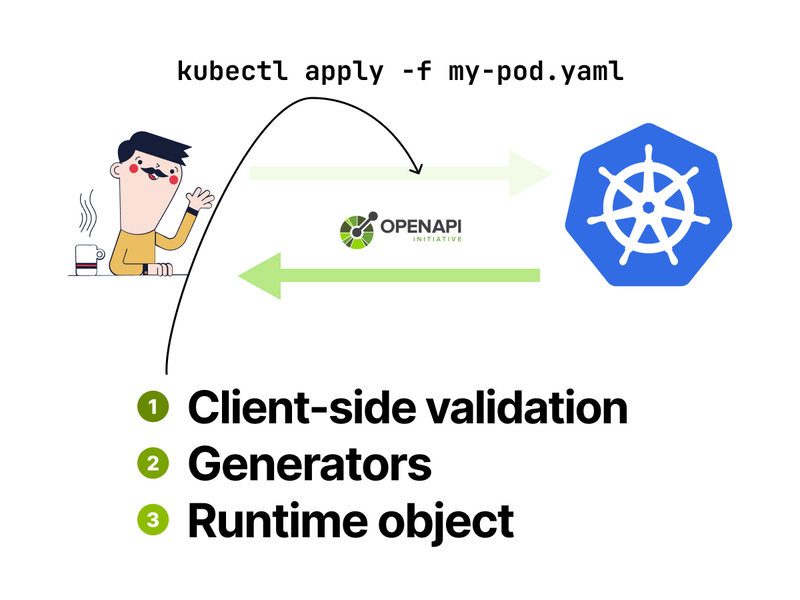
Let's start with the obvious: kubectl sends the YAML definition to the API server.
In this step, kubectl:
- Discovers the API endpoints using OpenAPI (Swagger).
- Negotiates the resource version.
- Validates the YAML.
- Issues the request.
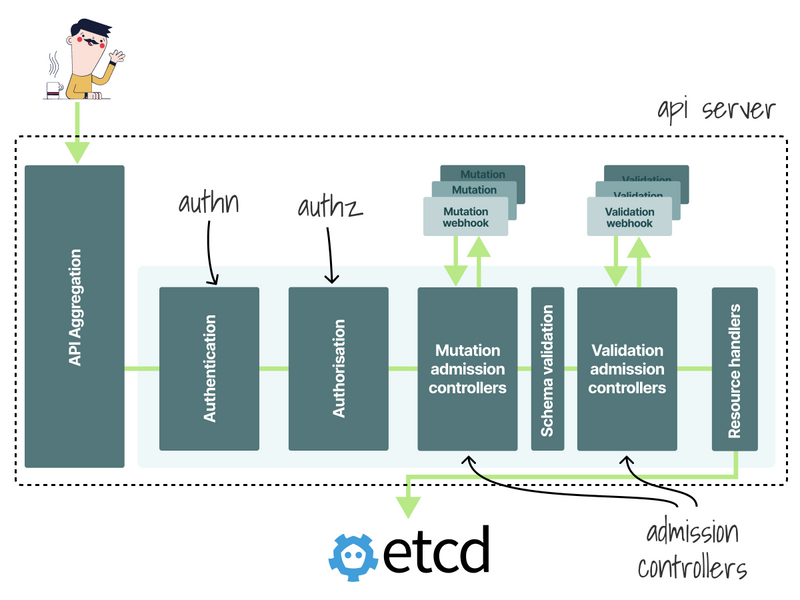
When the request reaches the API, it goes through the following:
- Authentication & authorization.
- Admission controllers.
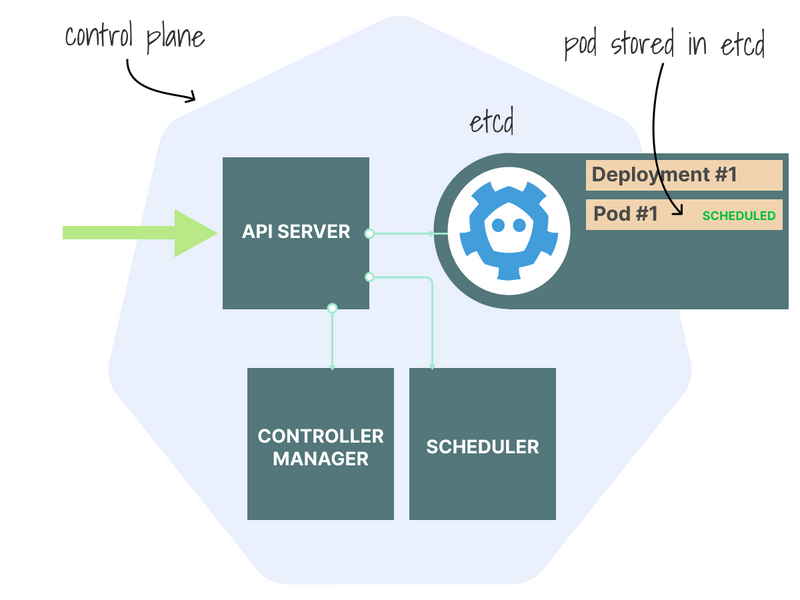
In the last step, it's finally stored in etcd.
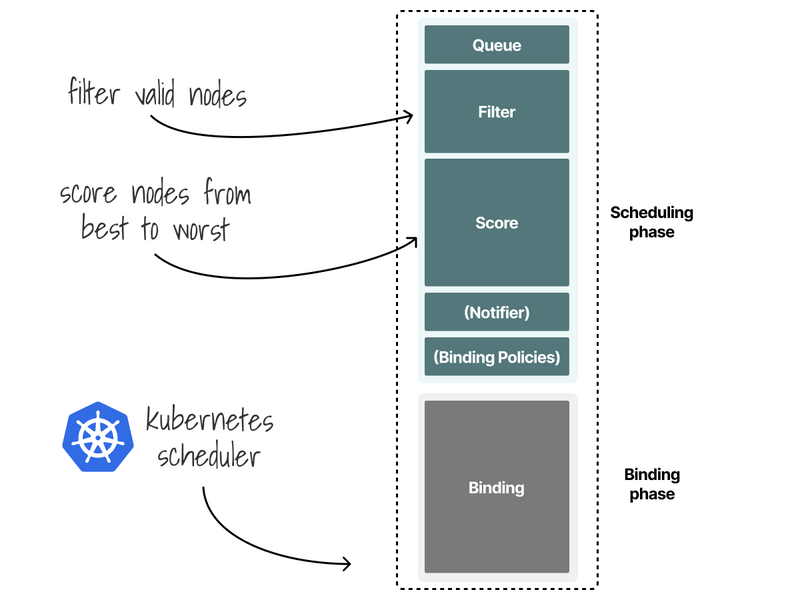
After this, the pod is added to the scheduler queue.
The scheduler filters and scores the nodes to find the best one.
And it finally binds the pod to the node.
The binding is written in etcd.
At this point, the pod exists only in etcd as a record.
The infrastructure hasn't created any containers yet.
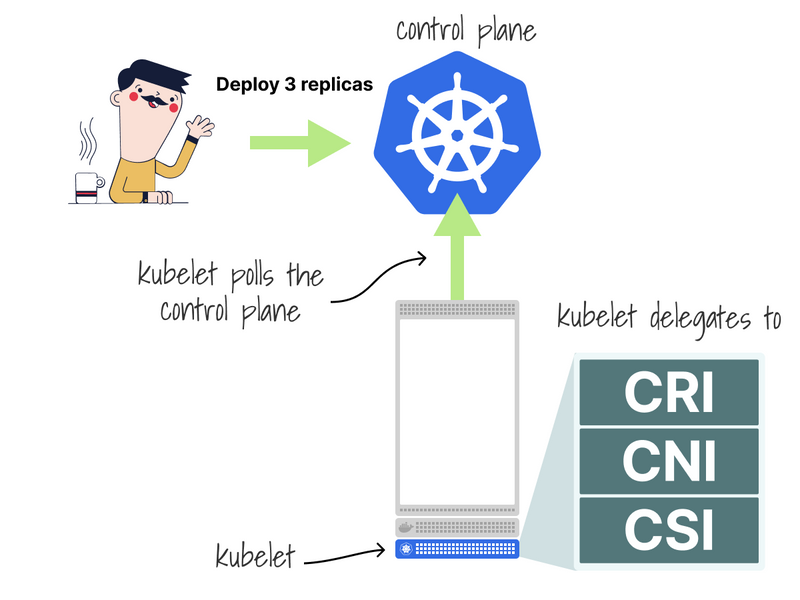
Here's where the kubelet takes over.
The kubelet pulls the Pod definition and proceeds to delegate:
- Network creation to the CNI (e.g. Cilium).
- Container creation to the CRI (e.g. containerd).
- Storage creation to the CSI (e.g. OpenEBS).
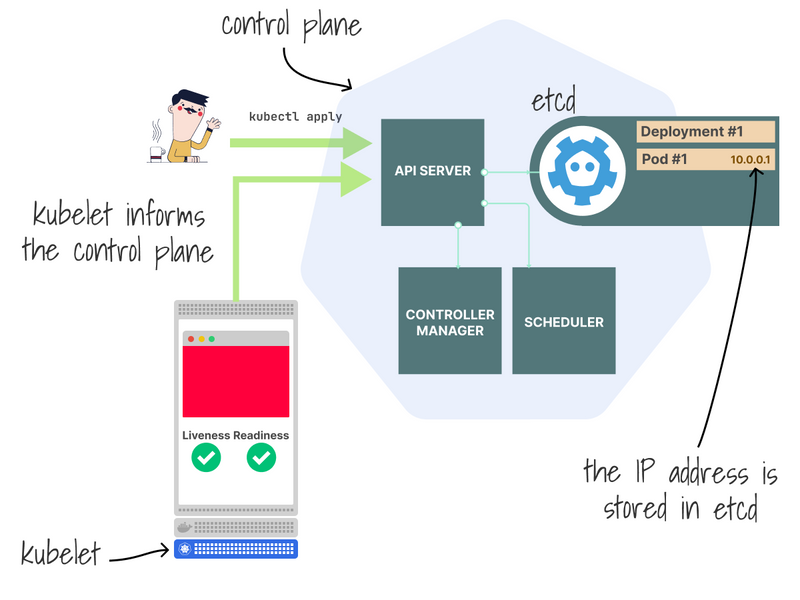
Among other things, the Kubelet will execute the Pod's probes and, when the Pod is running, report its IP address to the control plane.
That IP and the containers' ports are stored as endpoints in etcd.
Wait… endpoint what?
In Kubernetes:
- endpoint is a 10.0.0.2:3000 (IP:port) pair.
- Endpoint is a collection of endpoints (a list of IP:port pairs).
For every Service in the cluster, Kubernetes creates an Endpoint object with endpoints.
Confusing, isn't it?
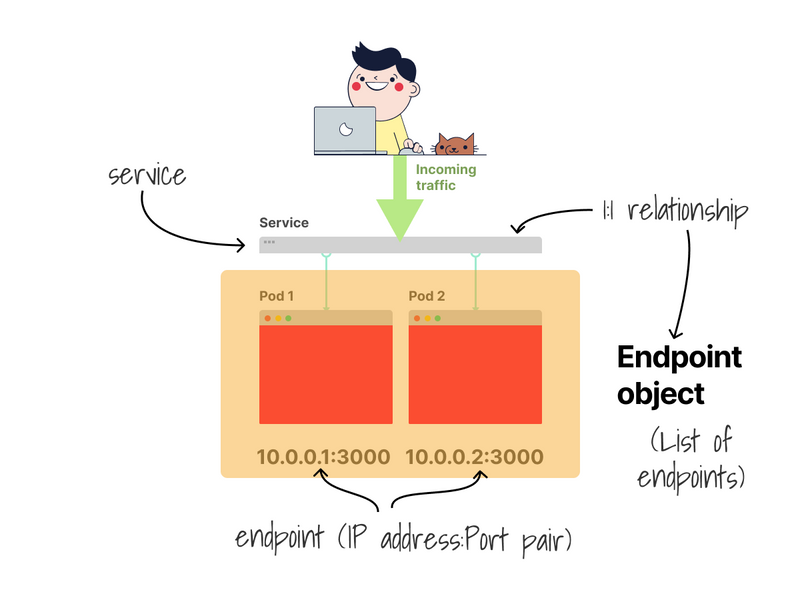
The endpoints (IP:port) are used by:
- kube-proxy to set iptables rules.
- CoreDNS to update the DNS entries.
- Ingress controllers to set up downstreams.
- Service meshes.
- And more operators.
As soon as an endpoint is added, the components are notified.
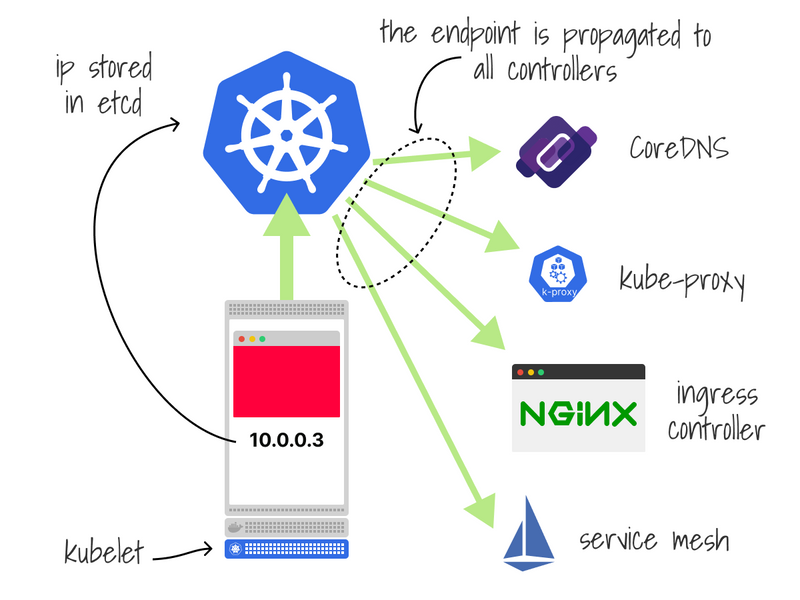
When the endpoint (IP:port) is propagated, you can finally start using the Pod!
What happens when you delete a Pod?
The exact process but in reverse.
This is annoying because there are few opportunities for race conditions.
The correct sequence is:
- App stops accepting connections.
- Controllers (kube-proxy, ingress, etc.) to remove the endpoint.
- App to drain existing connection.
- App to shut down.
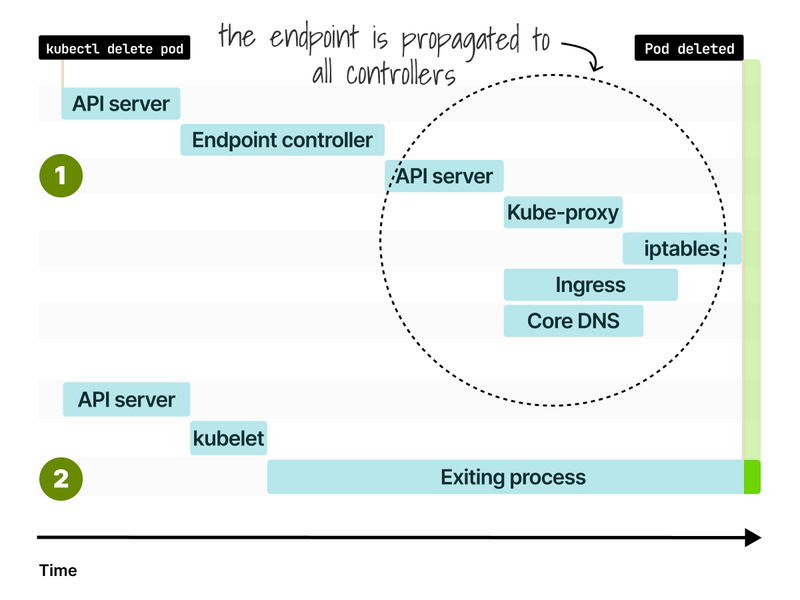
If you want to learn more about the graceful shutdown in Kubernetes, you can find my article here https://learnk8s.io/graceful-shutdown
And finally, if you've enjoyed this thread, you might also like the Kubernetes workshops that we run at Learnk8s https://learnk8s.io/training or this collection of past Twitter threads https://twitter.com/danielepolencic/status/1298543151901155330



Top comments (29)
The controls are easy to learn but hard to perfect. With just a single tap, you’ll navigate spikes, pits, and more — but perfecting the rhythm is where the real test lies. Play geometry dash subzero
So, what happens after I
kubectl apply -f deployment.yaml? The YAML definition is sent to the API server! From my experience, kubectl then does some magic, like finding the right API endpoints, making sure the resource version is right, and double-checking my YAML is actually valid.Ever tried juggling YAML while playing Basket Random ?
The API Server receives the request and validates it. If the request is valid, it saves the Pod's information to etcd (Kubernetes' distributed database). steal a brainrot
Excellent explanation of the inner workings of the Kubernetes pod creation process! An excellent resource for learning about the pod lifecycle is the comprehensive description of the interactions between the API server, scheduler, and kubelet. The part about endpoints and how kube-proxy and CoreDNS use them is quite helpful.
baseball bros io
The ease with which you can generate lengthier words to strategically position letters in order to extract information is the determining factor. run 3
I find that the process of locating the words truly challenges one's capabilities.
Great article, it is really informative and creative, it helps us to post new updates. It is really valuable. Thanks a lot. If you have more time, please visit: redactle for relaxation
Great breakdown of what happens behind the scenes when creating a Pod in Kubernetes! The detailed explanation of how the API server, scheduler, and kubelet interact is super helpful for understanding the pod lifecycle. I especially appreciate the section on endpoints and how various components like kube-proxy and CoreDNS use them.
snow rider
When you create a Pod in Kubernetes, it schedules the pod to run on a node, with one or more containers inside. Kubernetes manages its lifecycle, ensuring it's running, scaling, and maintaining the desired state. The pod can communicate with other resources and services in the cluster, while Kubernetes handles networking, storage, and replication.
When I first created a Pod in Kubernetes, I thought it was just a matter of sending a YAML file. But in reality, there was a complex process between kubectl, the API server, and many other components. Sprunki Retake
Feel the rush of Snow Rider 3D! Race down the slopes, dodge obstacles, and perform stunts that will leave you breathless. The excitement of winter sports awaits you—are you ready to take the plunge?
Some comments may only be visible to logged-in visitors. Sign in to view all comments.