


A CI job downloads a demo, saves it as demo.mp4 and publishes it. The job looks green until somebody tries to play the file and finds an HTML error page. A nonempty download and a familiar extension tell you that you have bytes. Before publishing, check what those bytes describe.

The filename comes from the download step. Check the file’s contents before publishing it.
Require a video stream before upload
Start with the completed local download. Keep your downloader’s HTTP status checks in place. This second check handles the file you actually intend to upload, including a bad response that reached disk anyway.
- Check the size. Reject zero bytes before starting a subprocess. The example also rejects anything over 25 MiB. Set that ceiling for your own artifact budget.
- Run ffprobe. Read its exit code and request JSON. An unrecognized input should fail here.
-
Look for a video stream with dimensions. A recognized audio file can probe successfully. Use uppercase
Vto exclude attached pictures, such as album cover art, and require a selected video stream with a positive width and height. ffprobe documentation
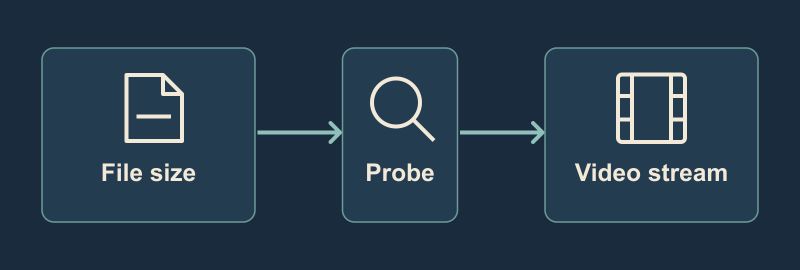
Reject empty or oversized files first, then inspect the remaining file for an actual video stream.
Save this as check_video.py. It uses Python’s standard library and runs the installed ffprobe binary directly. Set FFPROBE if the executable is outside your runner’s PATH.
#!/usr/bin/env python3
import json
import os
from pathlib import Path
import subprocess
import sys

MAX_BYTES = 25 * 1024 * 1024


def check_video(path):
    path = path.resolve()
    if not path.is_file():
        return 'not a regular file'
    size = path.stat().st_size
    if size == 0:
        return 'empty file'
    if size > MAX_BYTES:
        return 'over the 25 MiB limit'

    probe = subprocess.run(
        [os.environ.get('FFPROBE', 'ffprobe'), '-v', 'error',
         '-select_streams', 'V', '-show_entries',
         'stream=codec_type,width,height', '-of', 'json',
         '-i', str(path)],
        capture_output=True, text=True, timeout=15,
    )
    if probe.returncode != 0:
        return 'ffprobe could not read the input'
    streams = json.loads(probe.stdout).get('streams', [])
    if not any(
        stream.get('codec_type') == 'video'
        and stream.get('width', 0) > 0
        and stream.get('height', 0) > 0
        for stream in streams
    ):
        return 'no usable video stream metadata'
    return None


if __name__ == '__main__':
    if len(sys.argv) != 2:
        sys.exit('usage: python3 check_video.py PATH')
    path = Path(sys.argv[1])
    try:
        problem = check_video(path)
    except subprocess.TimeoutExpired:
        problem = 'ffprobe timed out'
    except (OSError, ValueError) as error:
        problem = f'could not complete check: {error}'
    if problem:
        sys.exit(f'REJECT {path.name}: {problem}')
    print(f'PASS {path.name}: video stream found')
Four inputs, three ways to fail
The script was tested locally on macOS ARM64 with ffprobe n4.4.1. The inputs were generated for this check. The good MP4 contains four small H.264 frames and the WAV contains silence.
| Local input | Gate exit | Result |
|---|---|---|
Empty empty.mp4
|
1 | Rejected before probing |
HTML saved as error.mp4
|
1 | ffprobe could not read it |
audio-only.wav |
1 | Probe succeeded, but the selected stream list was empty |
64×48 tiny.mp4
|
0 | Video stream found |
The WAV is the reason to read the JSON even after a successful probe. With this command, it returned exit 0 and an empty selected stream list.
Put the check in front of your publish command
On a runner that already has Python and ffprobe, add these lines to the shell step that publishes the artifact. Replace ./publish-demo.sh with your existing publisher. Run both commands in the same failing-on-error step, or make the publish step depend on a successful validation step.
set -eu
artifact=build/demo.mp4
python3 check_video.py "$artifact"
./publish-demo.sh "$artifact"
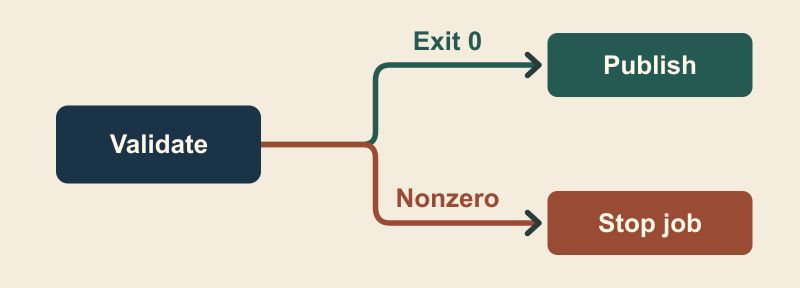
Put the check immediately before publishing and make that step depend on success.
Publish the same file you just checked. For example, keep validation after the last download or transformation so the publisher can’t pick up an older artifact by mistake. A nonzero exit should fail the job rather than quietly switch to a previous clip.
This gate recognizes a video stream from metadata. It does not decode the whole file, enforce an MP4 container or verify playback in a target browser. Add those checks if your publishing contract requires them. The file-size limit and probe timeout are resource limits for this example, and the CI call above is an integration pattern. The reproduced test ran locally.
If you want another demo clip to run through the same gate, the HeyDream free image-to-video tool can generate a candidate from a start image, an end image and a motion description. Disclosure: I am the founder of HeyDream. Check the downloaded file the same way. None of the four fixtures came from that tool.



Top comments (0)