

In the fast-paced world of digital content creation, finding the perfect shot is only half the battle. Often, a stunning landscape photo taken for a blog post or a travel album simply does not fit the vertical requirements of an Instagram Story, a TikTok cover, or a YouTube Reel. Traditionally, creators had two frustrating choices: crop the photo, which might cut out essential parts of the subject, or stretch the pixels, which results in a distorted and amateur look. AI Image Expander addresses this exact problem with a sophisticated, browser-based solution. AI Image Expander is a generative outpaint tool designed to grow the canvas around your original image. By using advanced artificial intelligence, it fills in the missing borders with contextually appropriate details, ensuring your subject remains centered and intact while the frame expands to your desired aspect ratio. Whether you are dealing with horizontal shots that need to be vertical or square product photos that need more breathing room for an advertisement, AI Image Expander provides a seamless, high-quality solution without the need for complex editing software or manual retouching.
Visit AI Image Expander at https://aiimageexpander.info to start transforming your photos today.
Advantages and Capabilities
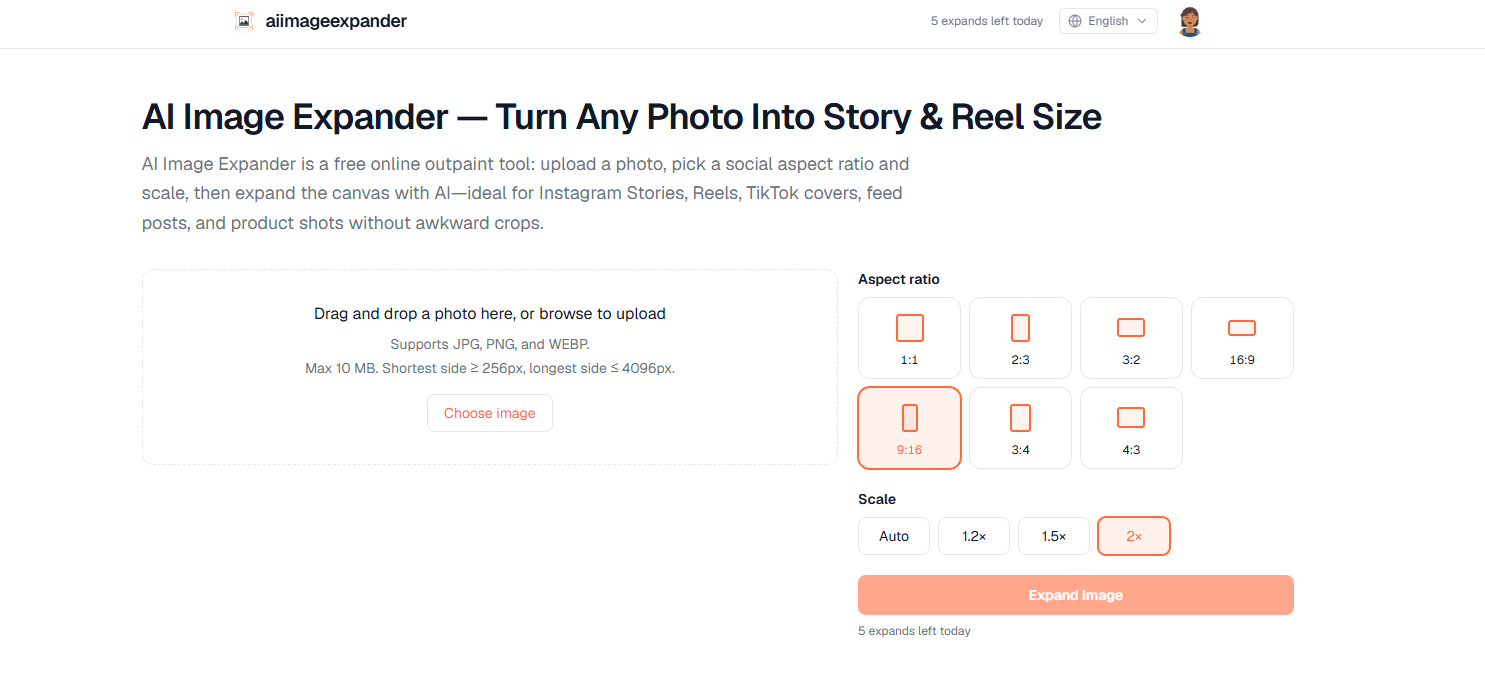
- Free AI outpainting technology that uses generative fill to expand canvas borders naturally based on image context.
- Social media specific presets for common aspect ratios including 1:1, 9:16 for Stories and Reels, 16:9 for covers, and traditional 3:4 or 2:3 frames.
- Flexible scaling options including an Auto mode or fixed multipliers such as 1.2x, 1.5x, and 2x to control the expansion area.
- Live canvas preview feature that allows users to see the proposed final layout and size before they spend a daily quota.
- No watermark on downloaded images, ensuring your content remains clean, professional, and ready for publication.
- Wide format support for standard web images including JPG, PNG, and WEBP files with a generous upload limit of 10MB.
- Browser-based accessibility with no software installation required, compatible with Windows, macOS, Linux, and mobile browsers on iOS or Android.
- Daily free quotas for everyone, allowing 3 successful expands per day for guests and 5 successful expands for signed-in users.
- Integrated history feature for users who sign in with a Google account, making it easy to manage and re-download past projects.
- Safety limits and preview bounds to ensure the final output stays within a 25 megapixel canvas for optimal performance.
Which problems it solves for the target audience
For social media creators and influencers, the primary challenge is maintaining visual consistency across platforms that demand different orientations. A photo that looks spectacular on a professional camera sensor often loses its impact when forced into a vertical mobile frame. AI Image Expander solves this by uncropping the photo, effectively inventing the background that was outside the original camera frame. This allows creators to repurpose high-quality landscape content for Instagram Stories or TikTok without losing the subject's details.
Online shop owners and e-commerce managers frequently run into the problem of product photos being shot too tight. When attempting to place a product in a promotional banner or a marketplace hero image, the lack of empty space or background context can make the design feel claustrophobic. AI Image Expander provides the necessary studio breathing room by generating realistic floor, wall, or outdoor backgrounds, helping product listings look more professional and visually balanced.
Travel bloggers and real estate professionals also find the tool indispensable. A beautiful landscape shot of a destination or a wide view of an interior might be too narrow for certain listing portals or blog headers. Instead of using unsightly white bars or blurry stretches, they can use the outpainting power at https://aiimageexpander.info to widen the view. This creates a more immersive and aesthetically pleasing experience for the viewer. Because the tool is beginner-friendly and requires no design background, it is a practical utility for anyone needing quick, high-quality social resizing without a subscription to expensive design suites.
FAQ
Q: Is AI Image Expander free to use?
A: Yes, AI Image Expander offers free daily quotas. Guests can perform 3 expands per day, while users who sign in with a Google account receive 5 expands per day.
Q: Are there watermarks on my final images?
A: No, AI Image Expander does not add any watermarks to your downloaded results, making them perfect for both personal and commercial use.
Q: What are the file size and dimension requirements?
A: You can upload JPG, PNG, or WEBP files up to 10MB. The image should have a shortest side of at least 256
AI Image Expander https://aiimageexpander.info



Top comments (14)
Perakende ürün etiketlemesi, envanter yönetimi ve dijital varlıkların fiziksel operasyonlarla entegrasyonu sürecinde doğru formatların seçilmesi büyük önem taşır; bu doğrultuda geliştirilen barkod oluşturma v2 çözümleri, işletmelerin ve içerik üreticilerinin taranabilir kodları güvenle üretmesine ve süreçlerini optimize etmesine olanak tanır.
AI outpainting is genuinely handy when a great photo has the wrong dimensions for a particular platform. Being able to extend the background instead of sacrificing important details through cropping makes the editing process much easier. The live preview and different aspect-ratio presets sound especially useful for quick content creation. I’ve also been exploring other online resources lately, including aviamasters.me.uk/.
AI outpainting solves a genuinely practical problem for creators who need to adapt one strong image across multiple platforms without sacrificing important details. The ability to expand the canvas while preserving the original subject is especially useful for turning landscape photos into vertical social content or giving product images more space for advertising layouts. That same idea of adapting resources to fit different situations makes a Blox Fruits inventory planning guide a useful companion for players who like optimizing their options.
AI outpainting solves a genuinely practical problem for creators who need to adapt one strong image across multiple platforms without sacrificing important details. The ability to expand the canvas while preserving the original subject is especially useful for turning landscape photos into vertical social content or giving product images more space for advertising layouts. That same idea of adapting resources to fit different situations makes a bloxxfruits.com/ Blox Fruits inventory planning guide a useful companion for players who like optimizing their options.
Generativní outpainting je pro tvůrce obsahu obrovský posun vpřed. Schopnost změnit poměr stran obrázku pro Instagram Stories nebo TikTok bez ořezání klíčových prvků nebo nepřirozeného roztahování pixelů šetří neuvěřitelné množství času při úpravách. bloxxfruits.com/
AI image expansion tools can be useful when a photo needs to fit a different social media format without cutting away important details. Generative outpainting can create extra space around the original image while keeping the composition bloxxfruits.com/
AI image expansion tools can be useful when a photo needs to fit a different social media format without cutting away important details. Generative outpainting can create extra space around the original image while keeping the composition more natural than simple stretching. More information is available at lucky-31.eu/.
nice .
Generativní outpainting je pro tvůrce obsahu obrovský posun vpřed. Schopnost změnit poměr stran obrázku pro Instagram Stories nebo TikTok bez ořezání klíčových prvků nebo nepřirozeného roztahování pixelů šetří neuvěřitelné množství času při úpravách.
Až si budete chtít dát pauzu od generování vizuálů a přizpůsobování formátů pro sociální sítě, navštívení stránky rodeoslot je fajn způsob, jak si odpočinout a na chvíli vypnout.
Používáte AI rozšiřování obrázků spíše pro úpravu produktových fotografií, nebo hlavně pro přizpůsobení snímků z cest na sociální sítě?
My workflow for creating banner ads or social posts usually involves a lot of back-and-forth between editing software to add "breathing room" to an image. This tool looks like it eliminates that step entirely, providing a seamless way to resize and expand images for different platforms without needing a design degree. It’s great to see free tools like this helping creators adapt their content so easily.
For anyone also looking into other tools, I’ve found some useful resources at capospins.com.de/ that help with different aspects of content creation and online management. But for pure image expansion, this AI tool is definitely going into my bookmarks. It’s practical, solves a real problem, and is ridiculously easy to use.
This AI Image Expander seems to solve that perfectly. The idea of using generative AI to "uncrop" a photo by inventing the background outside the original frame is brilliant. No more losing the main subject when you need a vertical shot from a horizontal landscape. The fact that it has presets for Stories, Reels, and covers is a huge time-saver. And no watermark for the free daily quota? That’s a massive plus for keeping things looking professional.
My workflow for creating banner ads or social posts usually involves a lot of back-and-forth between editing software to add "breathing room" to an image thor-fortune.pl/ This tool looks like it eliminates that step entirely, providing a seamless way to resize and expand images for different platforms without needing a design degree. It’s great to see free tools like this helping creators adapt their content so easily.