


If you have ever wondered whether your writing might get flagged by an AI checker before you hand in an assignment, you are not alone. More students are asking this question than ever — and that is exactly where ZeroGPT Plus comes in.
But ZeroGPT Plus is more than just a detection tool. It is a full writing support platform, and knowing what it actually offers — and how to use it intelligently — can make a real difference to your academic workflow.
What Is ZeroGPT Plus?
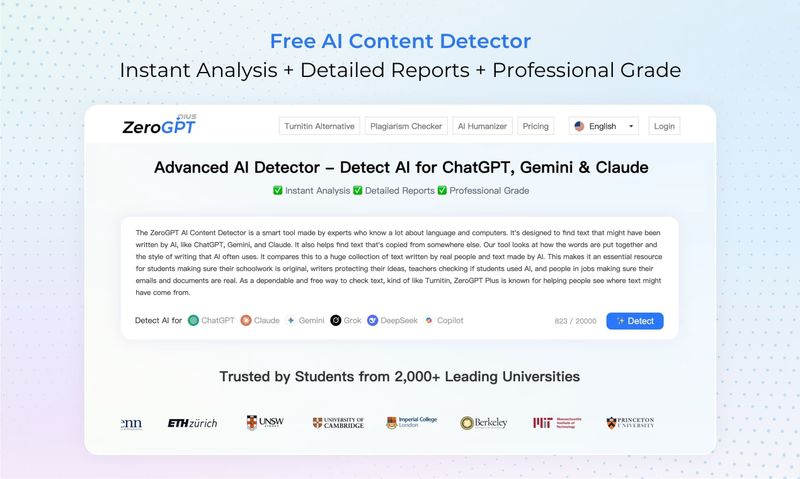
ZeroGPT Plus is a free, web-based platform built around two core functions: detecting AI-generated content and helping you improve your writing. It requires no login for basic use, works in over 20 languages, and is designed to be accessible to anyone — from first-year undergraduates to doctoral researchers.
The platform's detection engine analyzes text by examining linguistic patterns, sentence structure, statistical properties, and stylistic signals associated with AI language models. It supports content generated by models, including ChatGPT, Gemini, Claude, DeepSeek, and others, and outputs both an overall AI likelihood score and a sentence-by-sentence breakdown that highlights which parts of your text appear most AI-like.
Beyond detection, the platform includes a Plagiarism Checker, Grammar Checker, AI Paraphraser, Summarizer, and an Academic Paper Checker — making it a practical toolkit for students at any stage of the writing process.
The Tools Students Actually Use
AI Detector
This is the platform's headline feature. Paste your text — ideally at least 150–200 words for reliable results — and the detector returns a percentage score alongside highlighted sentences. Sentences shaded in yellow, orange, or red are the ones the tool considers most likely to have been AI-generated.
The key thing to understand here is that the score is a signal, not a verdict. Highly structured, formal academic writing can sometimes read as AI-like even when it is entirely your own work. Use the result as a prompt to review highlighted sections, not as a final judgment on your writing.
Academic Paper Checker
Designed specifically for research papers, theses, and academic articles, this specialized tool applies detection parameters suited to scholarly writing. If you are preparing a paper for journal submission or a major assignment, this is a more appropriate starting point than the general detector.
Grammar Checker
Once your content passes a detection check, the Grammar Checker helps you clean up spelling, punctuation, and grammar errors before submission. It is a useful final step in any editing workflow — particularly for non-native English speakers who want to polish their work without changing its voice.
Plagiarism Checker
Separate from AI detection, the plagiarism tool scans your text against a large database of existing sources to identify unintentional copying or insufficient paraphrasing. Using both the AI Detector and the Plagiarism Checker together gives you a more complete picture of your writing's originality.
AI Paraphraser
The Paraphraser helps you rewrite specific passages — useful when you want to express a complex idea in clearer language or restructure a sentence that feels too close to a source. It is a legitimate writing aid, not a shortcut. Using it to improve clarity is very different from using it to obscure AI-generated content.
How to Use ZeroGPT Plus as Part of Your Academic Workflow
Here is a practical sequence that many students find effective:
- Write your draft first. Complete your own writing before running any detection tools. The goal is to verify your work, not to write around a detector.
- Run the Academic Paper Checker or AI Detector. Paste your full text and review the highlighted sentences. Ask yourself: Does this section actually sound like me? If not, rewrite it in your own voice — adding specific examples, your own analysis, and varied sentence rhythms.
- Cross-check with the Plagiarism Checker. Confirm that your sources are cited correctly and that no passages inadvertently mirror existing content.
- Polish with the Grammar Checker. Fix any remaining errors. Accept suggestions that improve clarity, but skip any that would change your meaning or remove your voice.
- Submit with confidence. You have verified originality, checked for AI patterns, and polished the prose. That is a thorough pre-submission review.
How to Interpret Your Detection Results
This is the part most articles skip over, and it is the most important thing a student can know.
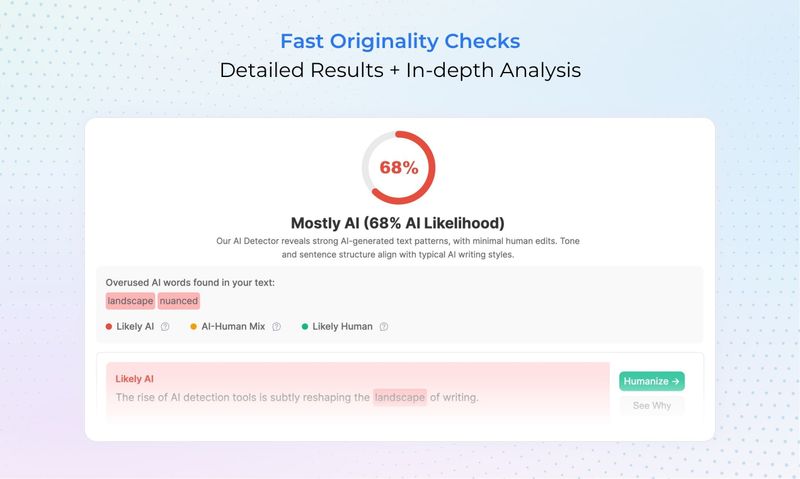
An AI likelihood score does not prove that you used AI. Detection tools analyze statistical patterns — and certain types of human writing, particularly formal academic prose, can produce elevated scores simply because structured writing shares some surface-level characteristics with AI output.
Several things can influence your score without any AI involvement:
- Writing in a formal or highly technical style
- Using common academic phrases and transitions
- Working in a second language, where writing may be more formulaic
- Having edited a draft heavily, which can compress sentence variety
If you receive an unexpectedly high score on writing you know is entirely your own, do not panic. Review the highlighted sections, add more personal analysis or concrete examples where possible, and run the check again. The goal is genuine, expressive writing — and the detector is a tool to help you get there, not a system to game.
What ZeroGPT Plus Is Not
It is worth being direct about limitations, because understanding them makes you a smarter user of the tool.
ZeroGPT Plus is not infallible. No AI detector is. Results should always be treated as a starting point for review, not a definitive verdict on authorship. Most universities and academic institutions explicitly advise against using AI detection results as sole evidence in academic integrity decisions — ZeroGPT Plus itself recommends pairing its results with human judgment and context.
It is also not a substitute for writing your own work. Running your assignments through a detector and adjusting them until the score drops is not the same as writing authentically. The tools on this platform are most useful when they support genuine learning — helping you understand where your writing might improve, not helping you disguise content that is not truly yours.
FAQ
Is ZeroGPT Plus free to use?
Yes. The core tools — including the AI Detector, Grammar Checker, and basic Plagiarism Check — are available on the free tier with no login required. Premium plans unlock higher character limits, batch processing, PDF report generation, and ad-free access.
How accurate is the AI detector?
ZeroGPT Plus claims accuracy rates above 98% on internal evaluations. Independent reviews suggest it performs well on unedited AI text but can produce false positives on formal academic writing. Treat any result as one signal among several, not as proof of AI use.
Can I use ZeroGPT Plus for a research paper?
Yes. The Academic Paper Checker is specifically optimized for scholarly content, including research papers, theses, and journal articles. It applies detection parameters tuned to academic writing styles, which tend to produce more relevant results than the general detector for formal work.
What should I do if my own writing gets flagged?
Review the highlighted sentences and ask whether they sound generic, repetitive, or overly formal. Add specific details, personal observations, or direct engagement with your sources. Writing that reflects your individual thinking and voice naturally produces lower AI scores.
Does ZeroGPT Plus store the text I paste in?
According to the platform's privacy policy, text submitted for analysis is not stored or used to train detection models after the session ends. Your content is processed only to generate your result.
Is it okay to use the Paraphraser for academic work?
Using the Paraphraser to improve the clarity of your own writing is generally acceptable, in the same way as a thesaurus or grammar tool is. Using it to disguise AI-generated content or to avoid writing your own work crosses into academic dishonesty territory. Always follow your institution's specific guidelines on AI tool use.
Final Thoughts
ZeroGPT Plus is a genuinely useful platform for students who want to take their writing seriously. The AI Detector helps you understand how your work reads to automated systems. The Grammar Checker cleans up the details. The Plagiarism Checker closes any gaps in your citations. Used together, these tools support a more thorough and confident pre-submission process.
The most important thing is to use them in the right order: write first, then verify. The platform is built to support authentic writing — and that is the same goal every student should bring to their work.



Top comments (0)